
AI Ops Guide
HubSpot MCP in 2026: Capabilities and When to Add Daeda AI
Choose HubSpot MCP or Daeda AI by task: CRM lookups, custom-object records, workflow changes and multi-portal work. Includes approval and data limits.
On this page
HubSpot’s AI connections have moved beyond simple read-only lookups. An old list of “what the official MCP misses” is no longer a useful buying guide.
The better question is: what are you trying to finish, and what must you review before it changes? Use this task-by-task guide to decide when native HubSpot is enough and when Daeda AI is worth evaluating.
First, two corrections to the old comparison
The official remote server now lists custom objects under read access. Separately, HubSpot’s Claude connector lists custom-object record creation and updates. Neither statement means unrestricted custom-object schema administration. These are different integration surfaces; check the one you actually use. Sources: remote MCP and Claude connector.
The Claude connector also supports Needs Approval for write tools. Our previous blanket claims that native tools could not access custom objects or ask for write approval were too broad.
1. “Find a record and update a field”
Start with the native connection when it supports that object and operation. Ask for a narrowly defined record set, inspect the proposed values and retain the appropriate approval controls.
There is little reason to add a managed data layer solely to change a known deal’s next step. Compare the actual workflow you need, not whether a tool carries an “AI for RevOps” label.
2. “Investigate a problem across portal data”
Daeda AI can query synced portal context to help investigate missing values, conflicting automation or cross-object relationships. That is useful when the question needs more than one record at a time.
The trade-off is freshness and coverage. A synced mirror is not the live portal. Check which objects and configuration are ready, how current they are, and which facts remain unverified. Do not treat an absent row as proof that something does not exist in HubSpot.
A useful brief is:
Investigate why these renewal records are missing follow-up. Identify the fields and workflows involved, show evidence for the suspected cause, and separate verified findings from assumptions. Do not make changes.
Use the portal investigation example to see the intended approach. There is no blanket promise of instant answers, full-portal coverage or freedom from rate limits.
3. “Prepare several changes I can review together”
This is the strongest reason to look at a Daeda AI Write Plan. The assistant prepares supported operations as a saved draft, and you review the intended work inside HubSpot before confirming execution.
For a renewal process, that might mean reusing a date property, creating a list and drafting a disabled workflow. Inspect the dependencies and operation details. Ask for a revision if the plan adds unnecessary assets or targets the wrong portal.
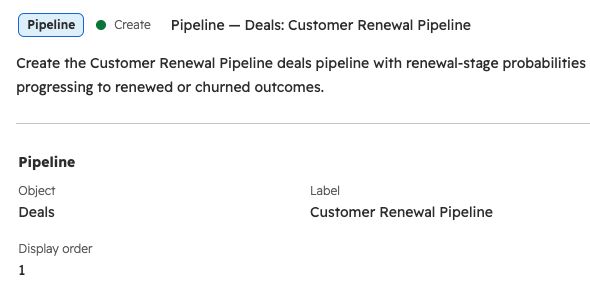
A detail excerpt from an existing, unexecuted test plan, captured in HubSpot on 10 September 2026. It shows the object, label and display order to inspect before approving a pipeline operation, not the hypothetical workflow example above. View full size.
Native tool approval and a saved implementation plan solve related but different review needs. Neither should be described as a guarantee that the design is correct.
4. “Use an existing custom object”
Begin by separating the work:
- Read records: inspect the native connection’s coverage first.
- Create or update records: verify support in the exact connector and the permissions granted.
- Add properties or change configuration: check the specific supported operation.
- Create a new object type: treat this as schema administration, not a consequence of record-level support.
Daeda AI supports work with existing custom objects, subject to its capability reference and connected access. Do not buy it on the assumption that every schema operation is available. Start with the supported capabilities and limitations.
5. “Repeat the work across client portals”
Daeda AI lets you work with multiple connected portals. Each still needs authorization, and the selected target must be explicit in the request and plan.
A native OAuth connection is scoped to its authorized account. Whether a client can retain several connections is a client-specific question; it is not accurate to say every native MCP setup forces disconnecting and reconnecting.
For agency work, test a representative two-portal task. Check that findings remain attached to the right account and review each plan’s target before execution. More portals increase the importance of those checks.
Choose by the next task, not the longest feature list
| Next task | Sensible starting point |
|---|---|
| Known-record lookup or supported update | Native HubSpot connection |
| Investigate related synced data and configuration | Evaluate Daeda AI’s coverage and freshness |
| Review a group of supported changes inside HubSpot | Daeda AI Write Plan |
| Query an existing custom object | Check native coverage first |
| Repeat an investigation across connected portals | Compare client connection management with Daeda AI’s multi-portal flow |
For a compact product comparison, use HubSpot MCP vs Daeda AI. If your immediate task is automation, the AI workflow-building guide walks through a small disabled draft.
View Daeda AI’s plans when that review-and-implementation flow fits your work. If native HubSpot already handles the task, there is no need to add another app.
Capability references checked 10 September 2026. This guide replaces the earlier “12 tools and missing features” framing; URLs are unchanged.
A few common questions
Frequently asked questions
Is HubSpot's official MCP enough for RevOps teams?
It may be. Check the objects, actions and review controls needed for your actual tasks before adding another tool.
Are custom objects a reason to buy Daeda AI?
Not by themselves. The official remote server supports custom-object reads, and HubSpot's Claude connector lists record creation and updates too. Compare the specific operation, not a blanket custom-object label.
Is approval unique to Daeda AI?
No. Native connectors can request write approval. Daeda AI offers a saved Write Plan that a person reviews and confirms inside HubSpot before execution.
Does Daeda AI avoid all API limits?
No. Queries can use synced data rather than repeatedly fetching live records, but synchronization and writes still depend on upstream services and limits. Check data readiness and operation results.
