
AI Ops Guide
What Is HubSpot MCP? A Guide for RevOps Teams
Understand HubSpot MCP, how it connects AI to your CRM, and how the remote server differs from native connectors, developer tools and Daeda AI.
On this page
HubSpot MCP is a way for an AI assistant to work with HubSpot through the Model Context Protocol. Instead of pasting a CRM export into a chat, you connect a server that exposes specific tools for reading data or making supported changes.
The important word is specific. MCP describes how the assistant and server communicate. It does not make every HubSpot feature available, give the assistant unlimited permissions, or guarantee that its answer is correct.
Think of the connection in three parts
- Your AI client interprets the question and chooses a tool.
- The MCP server exposes the operations that client can request.
- The connected HubSpot account determines the data, permissions and subscription features available.
For example, you might ask for open deals without a next step. The assistant needs the relevant deal fields, a clear definition of “open”, and a way to retrieve all matching records. The connection enables the work; those checks determine whether the answer is useful.
Which “HubSpot MCP” are you looking at?
| Name | What it is for |
|---|---|
| HubSpot Remote MCP Server | Connecting a compatible external AI client to CRM data |
| HubSpot’s managed AI connectors | A connector-specific installation and feature set inside an AI app |
| HubSpot Developer MCP Server | Building HubSpot apps and CMS assets |
| Third-party servers such as Daeda AI | Their own data access, supported operations and review workflows |
HubSpot describes the remote and developer servers as separate products in its official MCP documentation. Use our remote-server setup reference when you are ready to connect one.
Do not transfer a capability or limit from a managed connector to the direct remote server without checking. Their documentation can describe different supported operations.
What can the official remote server do?
It supports reading CRM data and selected write operations. The current read coverage includes custom objects; our earlier statement that they were entirely unavailable was outdated. Reading records, creating or updating records, and defining a new custom object type are separate questions.
Check the exact object and action you need, not just a headline saying “read and write”. For a buying decision rather than an introduction, use the HubSpot MCP vs Daeda AI comparison.
Does an AI connection make changes automatically?
A read request and a write request are different operations. Before permitting writes, check the connector’s approval settings and the proposed target records.
Native approval exists: HubSpot’s Claude connector documentation describes a Needs Approval setting for write tools. Approval alone is not unique to Daeda.
Daeda AI’s Write Plans add a different review flow: proposed operations are saved as a draft, inspected inside HubSpot, and executed after confirmation. That can be useful when several supported changes need reviewing together. It does not remove the need to verify their results.
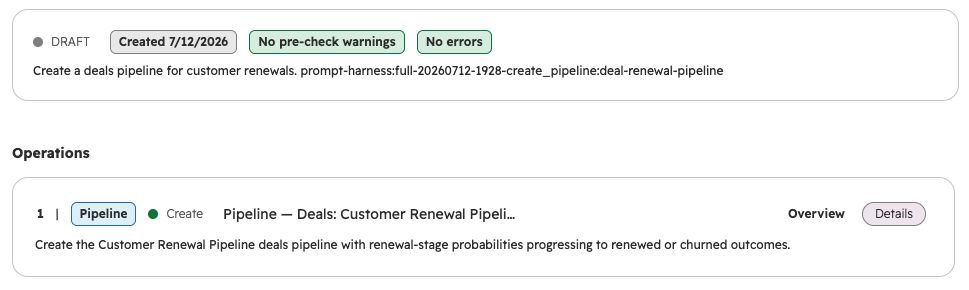
An existing test plan inspected in HubSpot on 10 September 2026. The proposed pipeline is still a draft; viewing it did not execute or approve it. A lack of pre-check warnings does not guarantee a correct design. View full size.
Start with a question you can check
For a first read-only task, choose a small, known slice of the portal:
In this portal, find open deals owned by me that have no next activity. Show the deal IDs, the fields you used and any limits on the result. Do not update anything.
Compare a few results with HubSpot. Check the portal, date range, field definitions and whether the response covers the whole requested set or only a page of results. If a tool uses synced data, check its freshness as well.
Then decide whether you need more:
- Native CRM access: try HubSpot’s remote server or the appropriate managed connector.
- Local read-only analysis: the free daeda-mcp package is a separate product focused on contacts, companies and deals.
- Portal investigation followed by reviewed implementation: explore Daeda AI and its supported capabilities.
The next step depends on the job
You do not need to learn the protocol to decide what to try. Start with the task, check which connection supports it, and keep the first result easy to verify.
For setup details, use the HubSpot MCP reference. For a practical automation task, read how to create HubSpot workflows with AI.
Capability references checked 10 September 2026. Recheck the current documentation and connected tool permissions before implementation.
A few common questions
Frequently asked questions
What does HubSpot MCP mean?
It usually means an MCP server that connects an AI assistant to HubSpot CRM data. HubSpot provides an official remote server; third-party servers such as Daeda AI use the same protocol with their own supported operations.
Is the HubSpot developer MCP the same thing?
No. The developer server helps build HubSpot apps and CMS assets. The remote server provides access to CRM data.
Can the official server access custom objects?
Yes, custom objects are listed for read access in the remote server documentation checked on 10 September 2026. That does not establish support for creating custom object types or every write operation.
Does connecting an AI give it unrestricted access?
No. Available tools and granted permissions matter. Review the exact connector's controls and test a small, read-only request before allowing changes.
