
Extract HubSpot properties from call transcripts for a fraction of a cent
Part of: AI-Powered HubSpot OperationsWant to pull properties out of your sales call transcripts? HubSpot can do it for you. It just charges per property, per call.
Jev charges per read. Reading the same transcript and answering 100 questions about it costs about a tenth of a cent. This post walks through how I do it, including the parts that are more work than HubSpot’s built-in option.
What HubSpot charges
HubSpot’s smart data capture fills deal properties from call and meeting transcripts. Since 14 April 2026, custom properties in smart data capture use 10 credits per custom property per transcript run. Standard properties are free. HubSpot credits cost $0.01 each.
So one call with 100 custom properties costs 1,000 credits, or about $10. Professional plans include 3,000 credits a month, which covers three of those calls.
What Jev charges
Jev is a decision model from TypeSafe, available through OpenRouter. You give it some context (the “state”) and a set of questions, and it returns an answer to each one. It is billed at $0.042 per million input tokens. Output is free and there is no charge per question.
| Call length | Approximate tokens | Jev requests | Approximate cost |
|---|---|---|---|
| 30 minutes | 20,000 | 1 | $0.0008 |
| 60 minutes | 28,000 | 1 | $0.0012 |
| 90 minutes | 36,000 | 2 | $0.0015 |
The questions themselves add some tokens, but not many: in our tests, 255 short yes/no questions came to about 4,700 input tokens. There is no public Jev tokenizer, so treat these as estimates and check the real figures on your OpenRouter activity page.
At these prices, 100 half-hour calls a day costs under 10 cents, and backfilling a thousand historical half-hour calls costs under a dollar.
The downsides
This is not a free lunch. Before you build it, know what you give up:
- Dropdowns and checkboxes only. Jev answers by picking from a list of options or by giving a yes/no probability. It can’t write a summary into a text property or pull a deal amount into a number property.
- No citations. You get a value and a confidence score, but not the part of the call that led to it. HubSpot’s smart data capture shows its sources.
- You run it. It’s a script, not a setting. You need API access, somewhere to run it, and a way to handle long calls.
If you can live with that, here’s how it works.
How it works
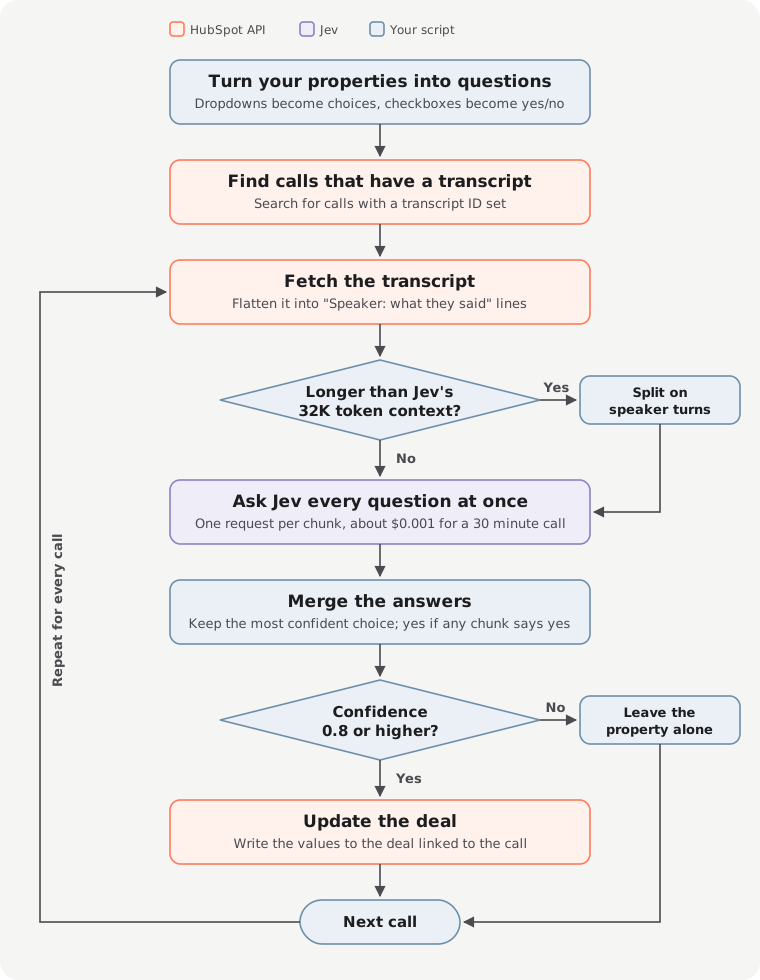
The whole process runs as a small script against the HubSpot and OpenRouter APIs. View full size.
1. Turn your properties into questions
Start with the deal properties you want filled. Each one becomes a question for Jev, built from the property’s label, description and options:
- A dropdown becomes a choice question, with each option as an answer Jev can pick.
- A checkbox becomes a yes/no question.
- Text and number properties are skipped, because Jev can’t answer them.
You only do this once. The same questions are asked of every call.
2. Find calls that have a transcript
HubSpot can return a transcript by its ID, but it can’t list them. So the script searches your calls for ones that have a transcript ID set, and works through them one at a time. The same search covers today’s calls or your entire call history.
3. Fetch the transcript
For each call, fetch the transcript from HubSpot’s calling transcripts API and flatten it into plain lines of “Speaker: what they said”. That text is what Jev reads.
4. Split long calls
Jev can read about 32,000 tokens at once, roughly an hour of conversation. Longer calls are split into chunks, always between speakers so no sentence is cut in half.
5. Ask Jev every question at once
Send each chunk to Jev with all of your questions in the same request. This is where the saving comes from: you pay to read the transcript once, not once per property.
6. Merge the answers
If a call was split, each chunk comes back with its own answers. For dropdowns, keep the answer Jev was most confident about. For checkboxes, answer yes if any part of the call says yes.
7. Only write confident answers
Jev returns a confidence score with every answer. Only values at or above your threshold (I use 0.8) are written to the deal linked to the call. Anything less certain is left alone, so a guess never overwrites good data.
Then it moves on to the next call.
What you need to build it
- A HubSpot app with access to read call transcripts and to read and update deals.
- An OpenRouter API key to call Jev.
- Somewhere to run it. A laptop is fine for a one-off backfill. For new calls, run it on a schedule.
Try it on a test portal or a handful of calls first. It writes to live deals.
Things to tune
Confidence threshold. I use 0.8. Raise it if wrong values are expensive to fix. Lower it if you would rather fill more fields and review them.
Property descriptions. Jev reads your property labels, descriptions and option descriptions. “Budget confirmed” is vague. “The prospect stated an approved budget for this purchase” gets better answers.
Long calls. Splitting evenly works, but TypeSafe recommends filtering the context in code first, because unrelated content lowers accuracy. If your calls follow a structure, sending only the relevant sections will help more than splitting.
Rate limits. Sending one request at a time is simplest. If you run a large backfill in parallel, back off and retry when Jev tells you to slow down.
The API is alpha. Jev’s decisions endpoint is at /api/alpha/decisions. The request format may change. This post is correct as of 30 September 2026.
When to use HubSpot’s version instead
If you fill a few standard properties, smart data capture costs nothing and needs no code. If you need text or number fields, or reviewers who want to see where each value came from, it does things this script can’t.
If you want dozens of custom dropdowns and checkboxes filled on every call, or you want to run new questions across your whole call history, reading each transcript once is much cheaper.
Want to use Jev inside HubSpot workflows without writing a script? Try the Jev workflow action. It classifies one property per workflow step, which suits short text like tickets and form submissions rather than full transcripts.
