
AI ticket routing in a HubSpot workflow for $0.0004 a ticket
Part of: AI-Powered HubSpot OperationsWant to guess how much it costs to classify a support ticket with AI inside a HubSpot workflow?
About $0.0004.
This post shows the workflow I use to route new tickets to Support, Sales or Marketing with Jev, including the prompt, the confidence threshold and what happens when it isn’t sure.
The workflow
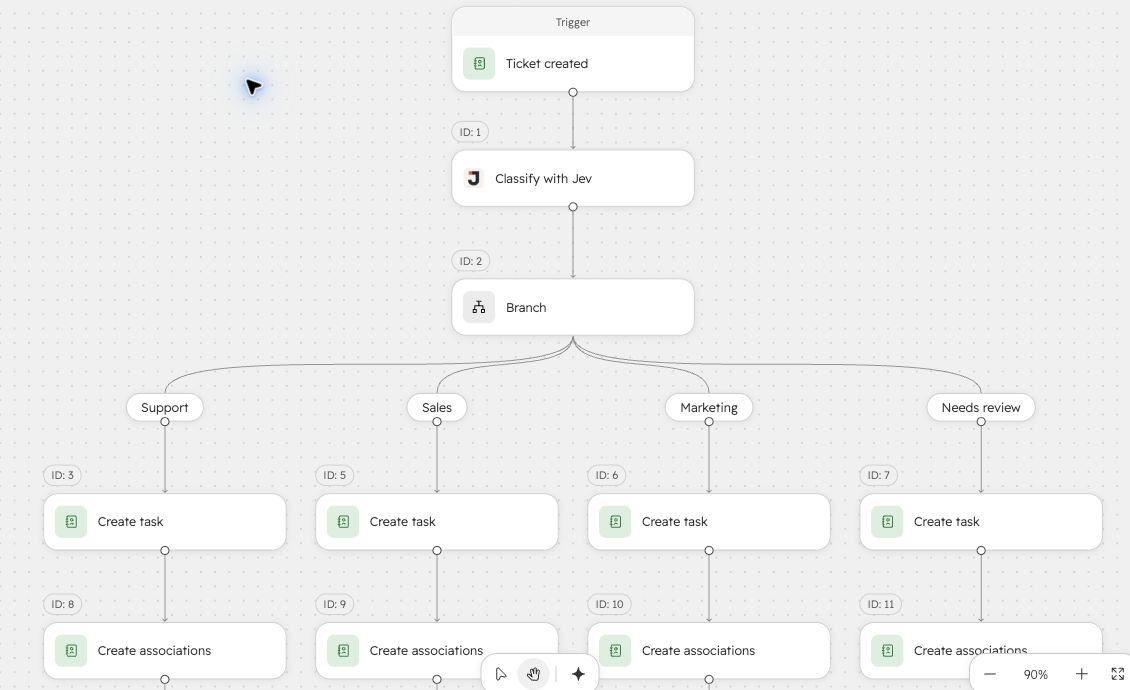
My ticket-routing workflow in a test portal, using synthetic tickets. View full size.
- Trigger: a ticket is created.
- Classify with Jev: reads the ticket description and sets the ticket’s department property.
- Branch on the result: Support, Sales or Marketing, with a Needs review branch for anything uncertain.
- Create a task for the right team in each branch.
Only step 2 is new. The rest is a normal HubSpot workflow.
The action settings
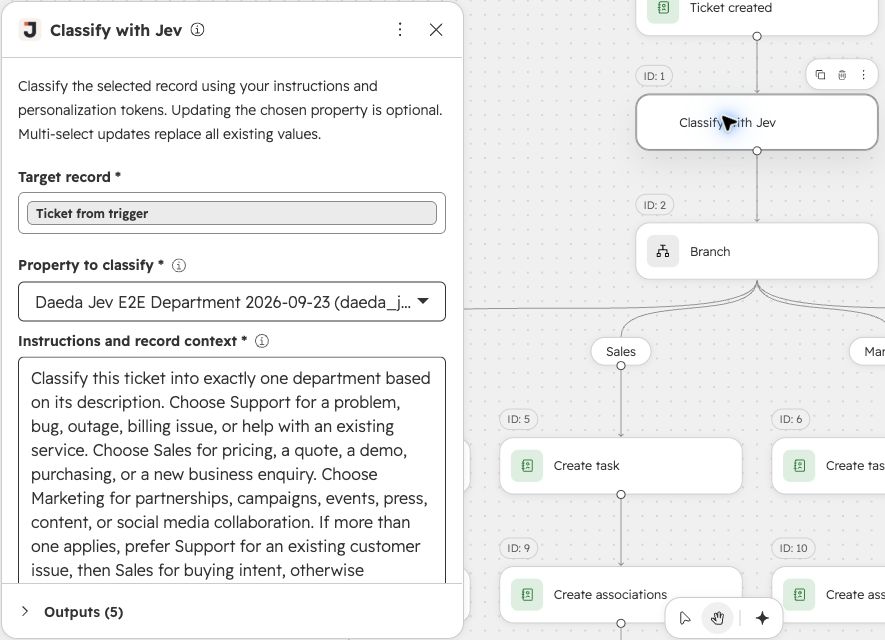
Property to classify. A single-select ticket property with the options Support, Sales and Marketing. Jev can only choose from the options the property already has, so it can’t invent a new department.
Instructions and record context. This is the prompt. Mine is:
Classify this ticket into exactly one department based on its description. Choose Support for a problem, bug, outage, billing issue, or help with an existing service. Choose Sales for pricing, a quote, a demo, purchasing, or a new business enquiry. Choose Marketing for partnerships, campaigns, events, press, content, or social media collaboration. If more than one applies, prefer Support for an existing customer issue, then Sales for buying intent, otherwise Marketing. Use only the ticket description below; do not invent details.
Ticket description: [Ticket description token]
A few things make this work well:
- Every option has a definition. “Sales” alone is ambiguous. “Pricing, a quote, a demo, purchasing, or a new business enquiry” is not.
- There’s a tie-break rule. A customer asking about pricing for an upgrade could be Support or Sales. The prompt says which wins.
- The record data comes in through a personalization token. Add whichever ticket properties help: subject, description, source, the associated company’s plan.
Update selected property. When ticked, Jev writes its answer to the property. Leave it unticked to test: the action still returns its outputs without changing the ticket.
Minimum confidence for update. Jev only updates the property when its confidence is at or above this value. The default is 0.8.
Handling uncertain tickets
The action returns four outputs you can use later in the workflow:
| Output | What it contains |
|---|---|
| Selected internal value | The option Jev chose |
| Decision confidence | A score between 0 and 1 |
| Decision status | Decided, Low confidence, or an error status |
| Property updated | Whether the property was changed |
Branch on Decision status. Decided tickets follow their department branch. Low confidence tickets go to Needs review, where a person picks the department. Every other status also goes to review, so a failure never leaves a ticket unrouted.
What it costs
Jev is billed by the token, not by the question, and a ticket description is short. Each classification in my tests cost about $0.0004.
| Tickets per month | Approximate cost |
|---|---|
| 1,000 | $0.40 |
| 10,000 | $4 |
| 100,000 | $40 |
For comparison, HubSpot’s product catalog lists its data agent at 10 credits per prompt per record. At $0.01 per credit, that’s $0.10 per ticket.
Before you rely on it
Jev is an experiment, and I’d treat it as one:
- Test with your own tickets. Run it with Update selected property unticked on a few weeks of real tickets, and compare its answers with what your team chose.
- Keep the review branch. Low confidence is useful information. Don’t drop the threshold just to get fewer tickets in review.
- Watch the daily quota. The app settings page shows how many requests you’ve used today and when the allowance resets.
Other things to classify
The same pattern works for any short text in a record:
- Sorting inbound enquiries by product or intent.
- Tagging feedback by theme with a multi-select property.
- Flagging whether a ticket mentions cancelling, using a checkbox property.
For long text like call transcripts, see how to extract HubSpot properties from call transcripts with Jev.
