THE WORKFLOW IMPLEMENTATION GUIDE
How to rate-limit
HubSpot workflows
From native controls to shared queues.
Use HubSpot’s built-in rate controls for a custom-code or webhook action. Calculate the setting from API requests per execution, then account for every workflow sharing the allowance. When those workflows need one common release budget, use a shared queue.
We build Daeda Throttle. This guide starts with HubSpot’s native options and explains when a separate queue helps.
Your workflow works for five contacts. Then you enroll 500, and API calls start failing. The difference may be how closely the requests arrive, not what any individual record is doing.
We’ll work through a synthetic enrichment example: three workflows, 100 records each, and two API requests per record. The receiving service has an example allowance of 100 requests per minute. These numbers are a teaching scenario, not a published HubSpot or vendor entitlement.
01 / THE PROBLEM
Why can bulk enrollment overwhelm an API?
Many records can reach a workflow action close together. Each action execution may send several API requests, and several workflows may call the same provider account. Their combined traffic can exceed the destination’s allowance even when a small test succeeds.
A record is the enrolled contact, company or other object. An action execution is that record running one workflow step. An API request is one call made during the step. One execution can make zero, one or many requests.
HubSpot documents that many objects can enroll together. That does not mean it sends unlimited traffic: HubSpot has its own scheduling, safeguards and configurable controls. Those are different from the particular budget available at your destination. Read HubSpot’s custom-code execution guidance.
Time →
Why doesn’t a delay always fix it?
If 300 records enter a ten-minute delay close together, they can leave it close together ten minutes later. An equal delay shifts their timing; it does not by itself allocate a shared number of executions per minute. Use a rate control when you need a release allowance.
02 / START HERE
Does HubSpot have built-in workflow rate limiting?
Yes. HubSpot custom-code and webhook actions have configurable rate limits on action executions per time period. For one suitable action, this may solve the problem completely. The setting is disabled by default in HubSpot’s documentation.
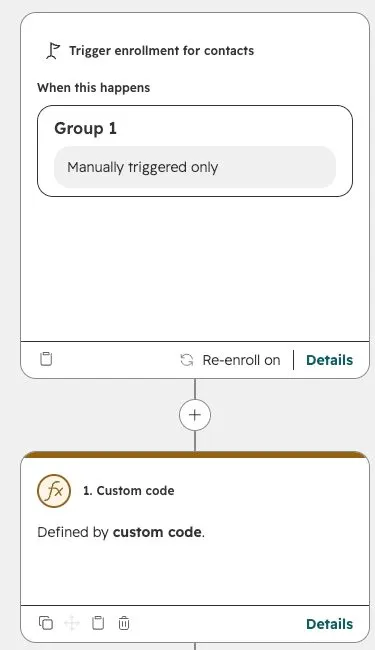
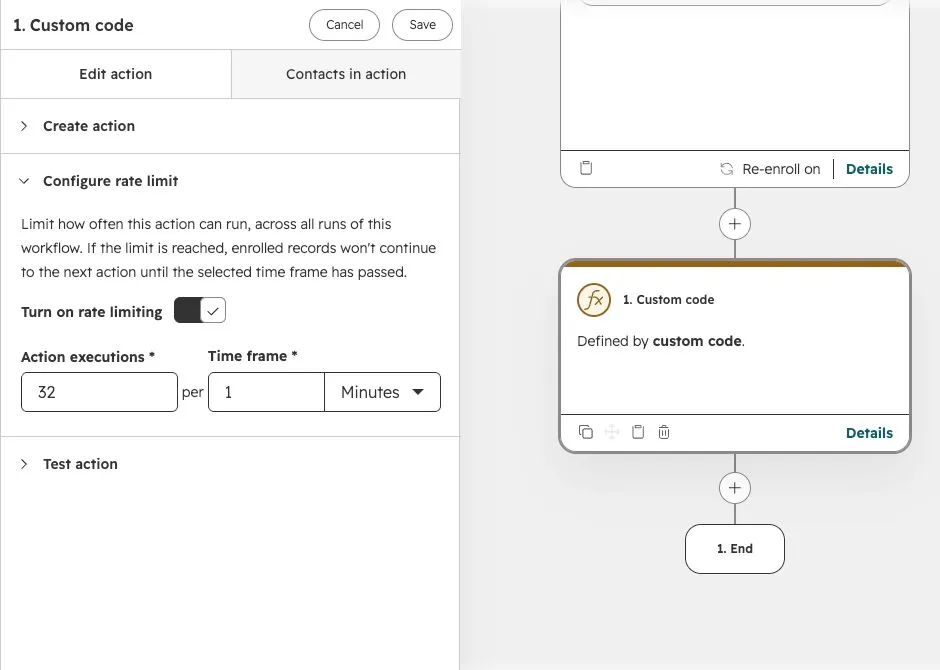
Configure a custom-code action
Custom-code workflow actions require Data Hub Professional or Enterprise. Check HubSpot’s current availability.
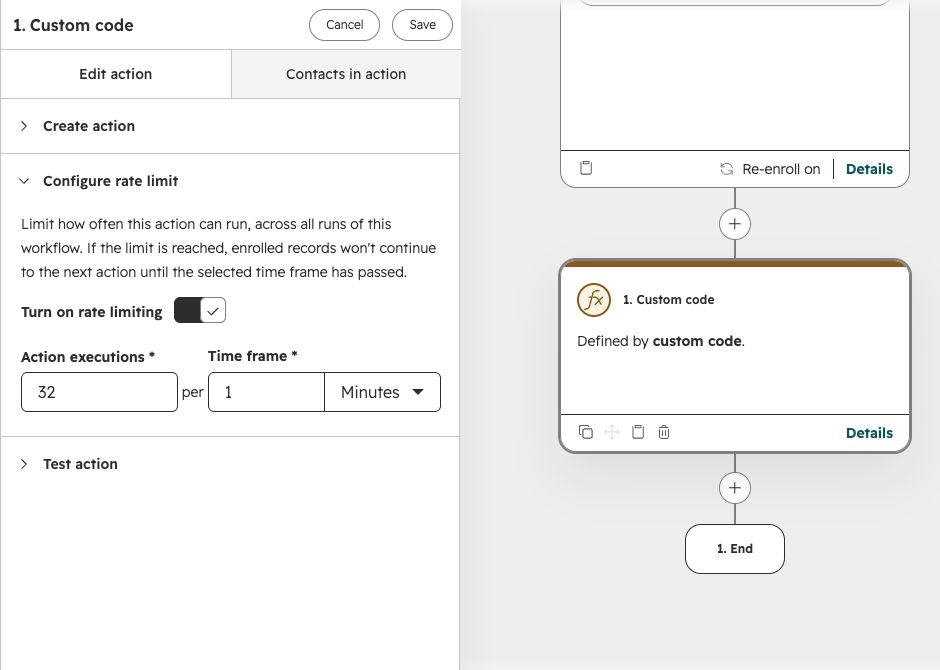
- Open the workflow and select its Custom code action.
- Expand Configure rate limit at the bottom of the action settings.
- Turn on Turn on rate limiting.
- Set Action executions and Time frame. Calculate the execution allowance using the requests each execution makes.
- Save, test a representative batch, and inspect the action history and receiving API.
The limit also slows progress into actions that follow the custom-code step. It counts executions, not every HTTP call inside your code. If each execution makes two requests, 32 executions can produce 64 requests. HubSpot custom-code rate-limit instructions.
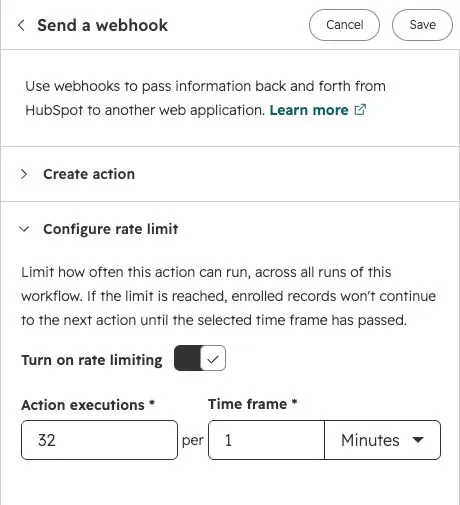
Configure a webhook action
Open Send a webhook, expand Configure rate limit, enable it, and set the executions and time frame. Check that the action is available in your subscription; HubSpot currently lists workflow webhooks under Data Hub Professional and Enterprise. HubSpot webhook setup and rate controls.
03 / THE CALCULATION
How do I calculate the right workflow rate limit?
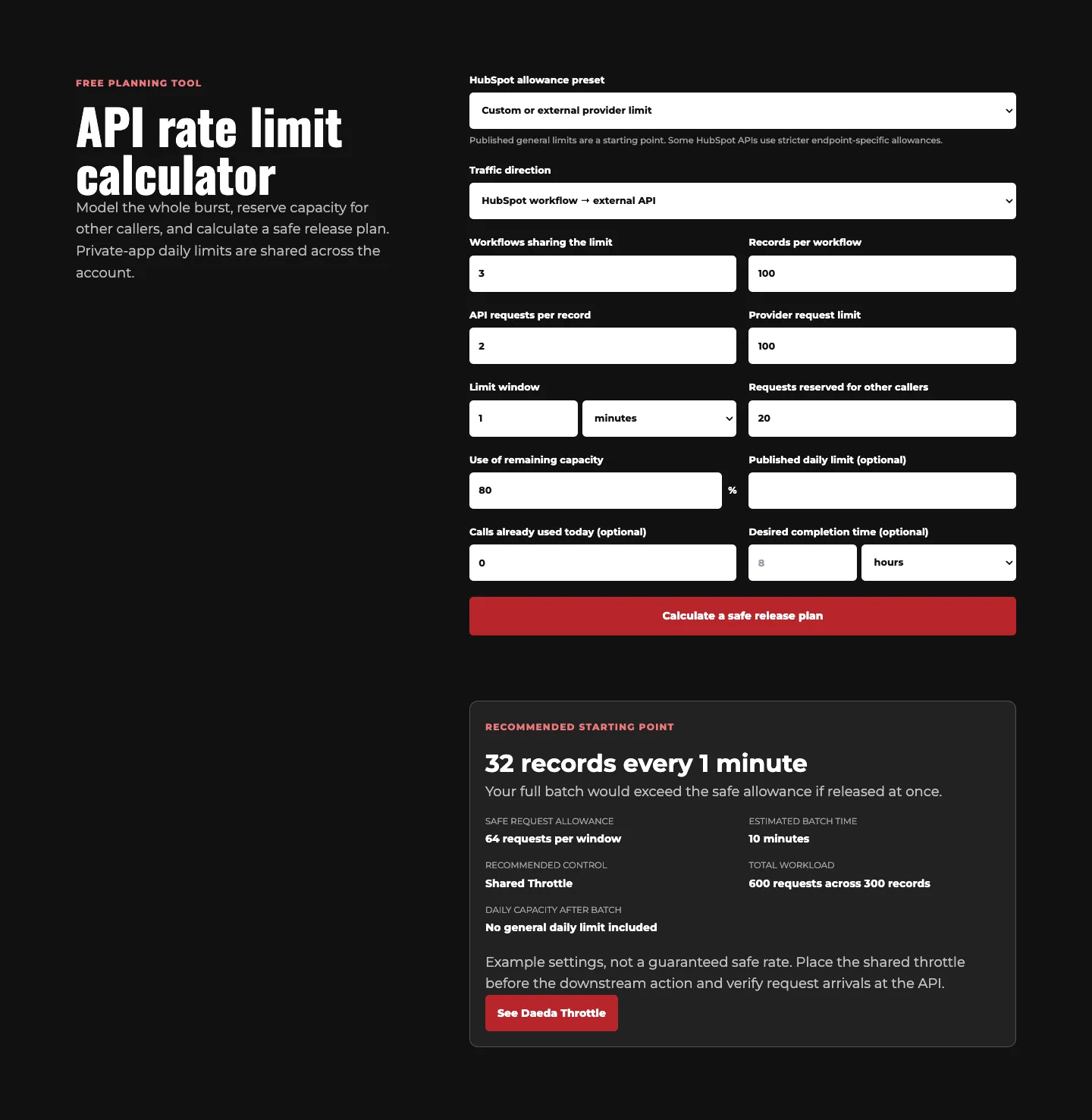
Subtract traffic reserved for other callers from the API allowance, use a chosen fraction of that remaining capacity, then divide by requests per execution and round down. Use the same time window throughout the calculation.
| Input | Value |
|---|---|
| Records | 3 workflows × 100 = 300 |
| Requests to this provider per record | 2 |
| Provider allowance | 100 requests per minute |
| Reserved for other callers | 20 requests per minute |
| Fraction of remaining capacity used | 80% (example choice) |
(100 − 20) × 0.80 = 64 requests/minute
floor(64 ÷ 2) = 32 records/minute
This is the combined allowance for the participating workflows.The complete workload is 600 requests. At 32 records per release, 300 records require ten batches. The calculator’s ten-minute estimate is a planning value, not a promise: the first release time, workflow scheduling, request latency and retries affect actual completion.
First remove avoidable calls. For HubSpot record data, custom-code inputs can provide properties without a lookup, and outputs can feed an Edit records action instead of a separate HubSpot API write. HubSpot’s input and output guidance.
05 / CONFIGURE THE QUEUE
How do I configure a shared queue with Daeda Throttle?
Create a named queue in Daeda Throttle’s settings, set its batch size and interval, then select the same queue in every participating workflow. Put the Shared Throttle step immediately before the action that consumes the allowance.
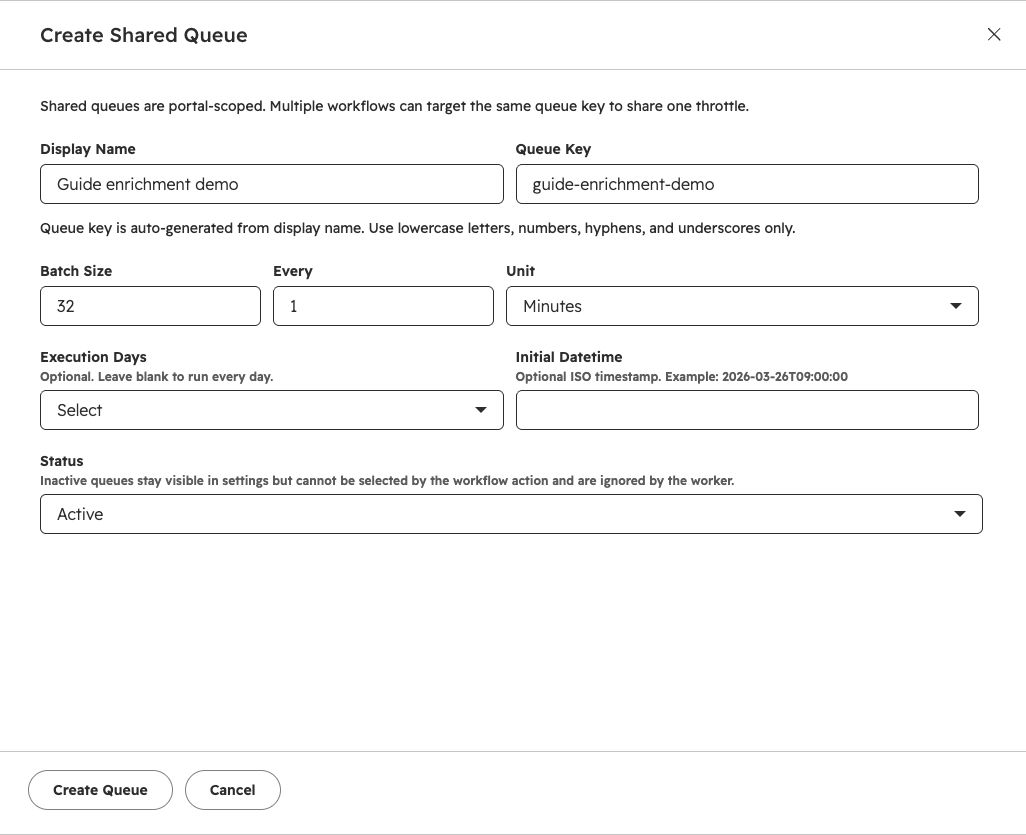
- Open Daeda Throttle → Settings → Shared Throttle in your connected apps.
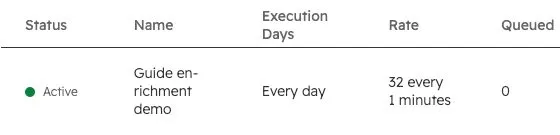
- Select Create Shared Queue. Give it the display name Guide enrichment demo and queue key
guide-enrichment-demo. - For this example, set Batch Size: 32, Every: 1, Unit: Minutes, and Status: Active. Leave optional execution days and initial datetime blank for this continuous test.
- Create the queue. In each of the three workflows, add Shared Throttle immediately before the custom-code action.
- Choose Guide enrichment demo in the action’s Shared Queue field. Save each workflow and verify all three use the same queue.
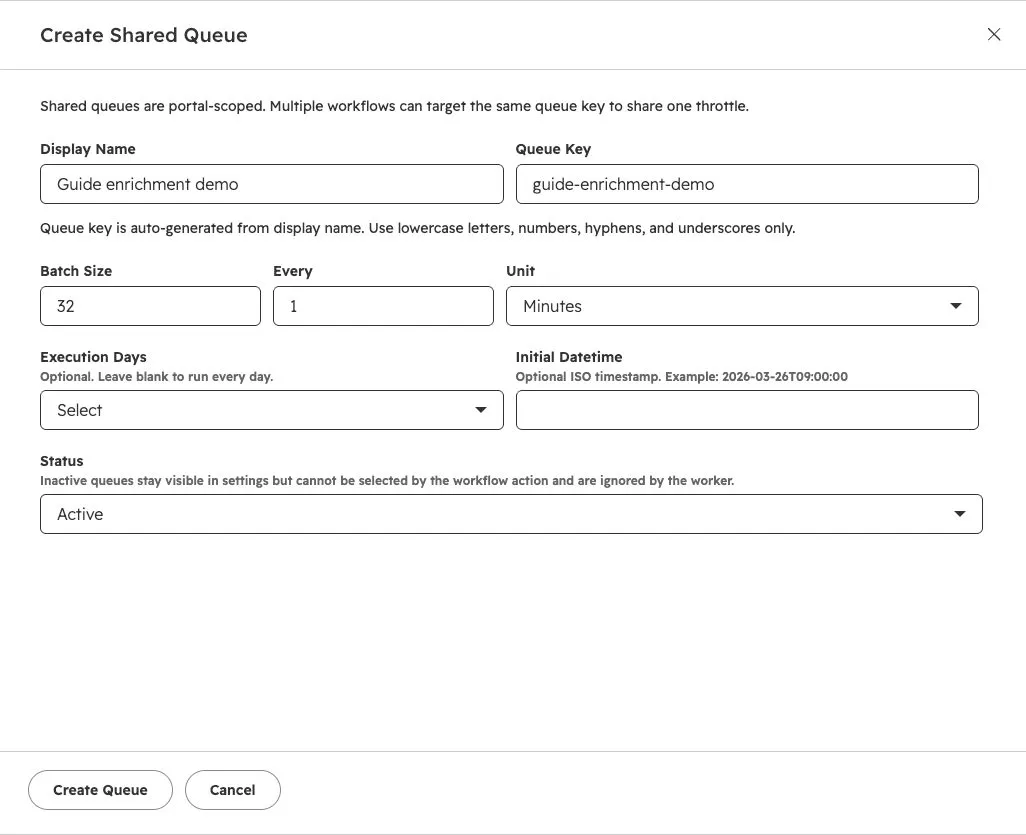
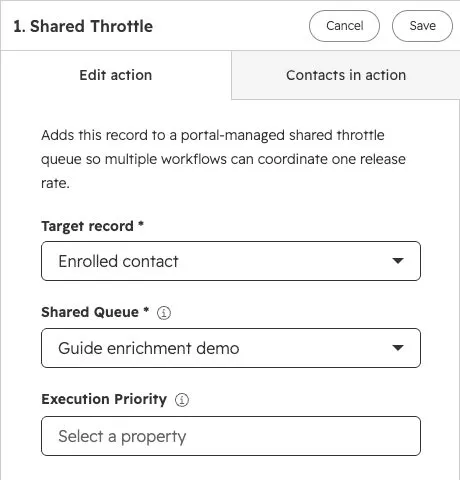
All three workflows select Guide enrichment demo. The shared allowance is 32 records per minute across this group, not 32 for each workflow.
What happens to a waiting record?
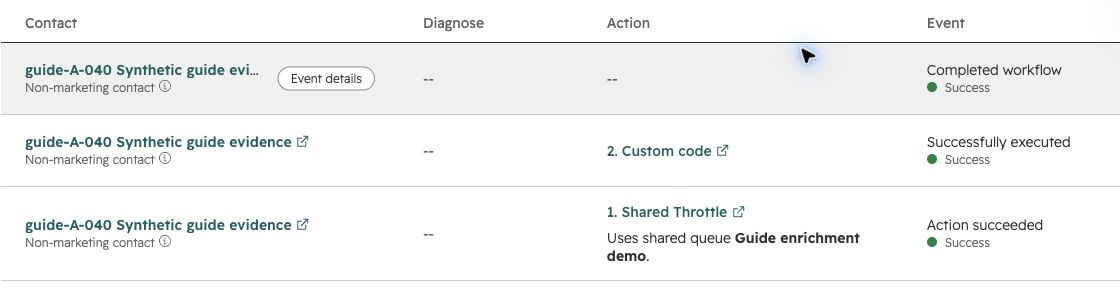
Daeda saves the action callback and tells HubSpot to hold that execution. The queue worker later completes callbacks for a configured batch, allowing those records to continue. This uses HubSpot’s supported asynchronous custom-action mechanism. HubSpot’s blocking and callback documentation.
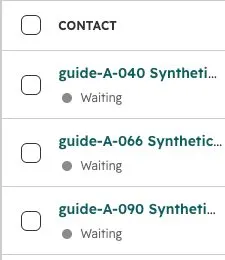
guide-A-040 was waiting at Shared Throttle.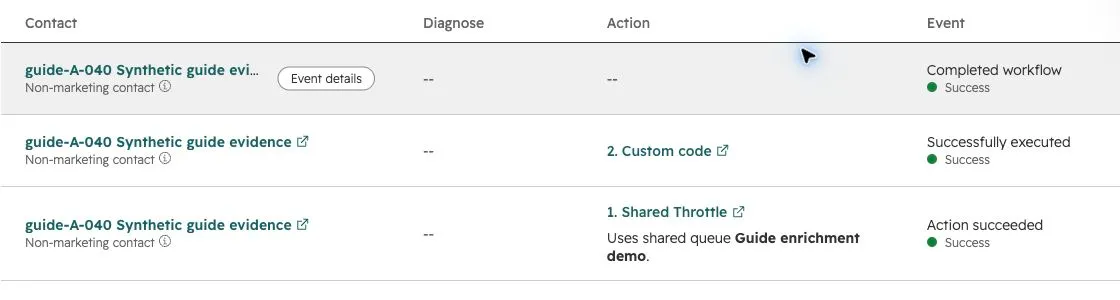
This record illustrates waiting and continuation; it does not establish equal service between workflows or a promised wait time. The complete run data below includes every expected record.
What if I only have one workflow?
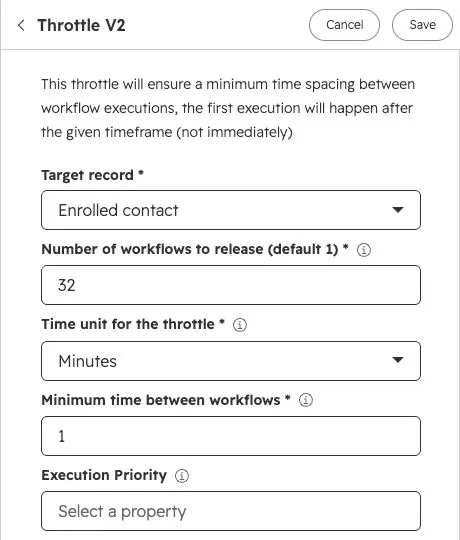
If a native action limit already meets your needs, use it. For a Daeda queue at one step, choose Throttle V2 and set the release count, interval and unit there. Its release-count field refers to enrolled workflow executions, not the number of separate workflow definitions.
06 / VERIFY THE BEHAVIOUR
How can I verify that workflow throttling is working?
Measure incoming requests and successful operations at the receiving service, alongside records waiting and continuing in HubSpot. Compare actual request windows, 429 responses, retries and completion time. A successful throttle release alone does not prove the API operation succeeded.
A fair comparison includes correctly divided native budgets. The overloaded 32-per-workflow example demonstrates a budgeting mistake; it is not evidence that native controls cannot work.
The measured experiment
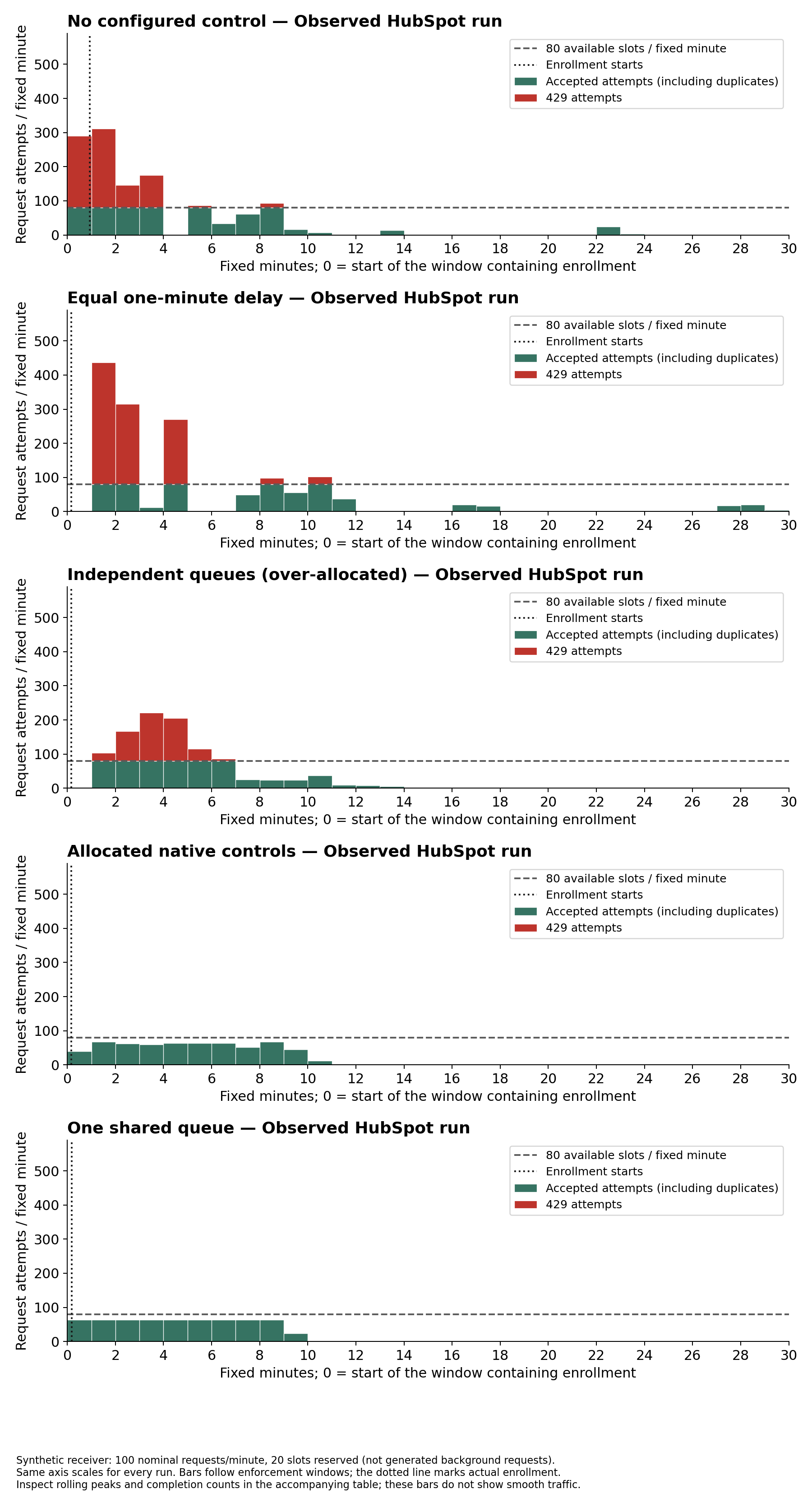
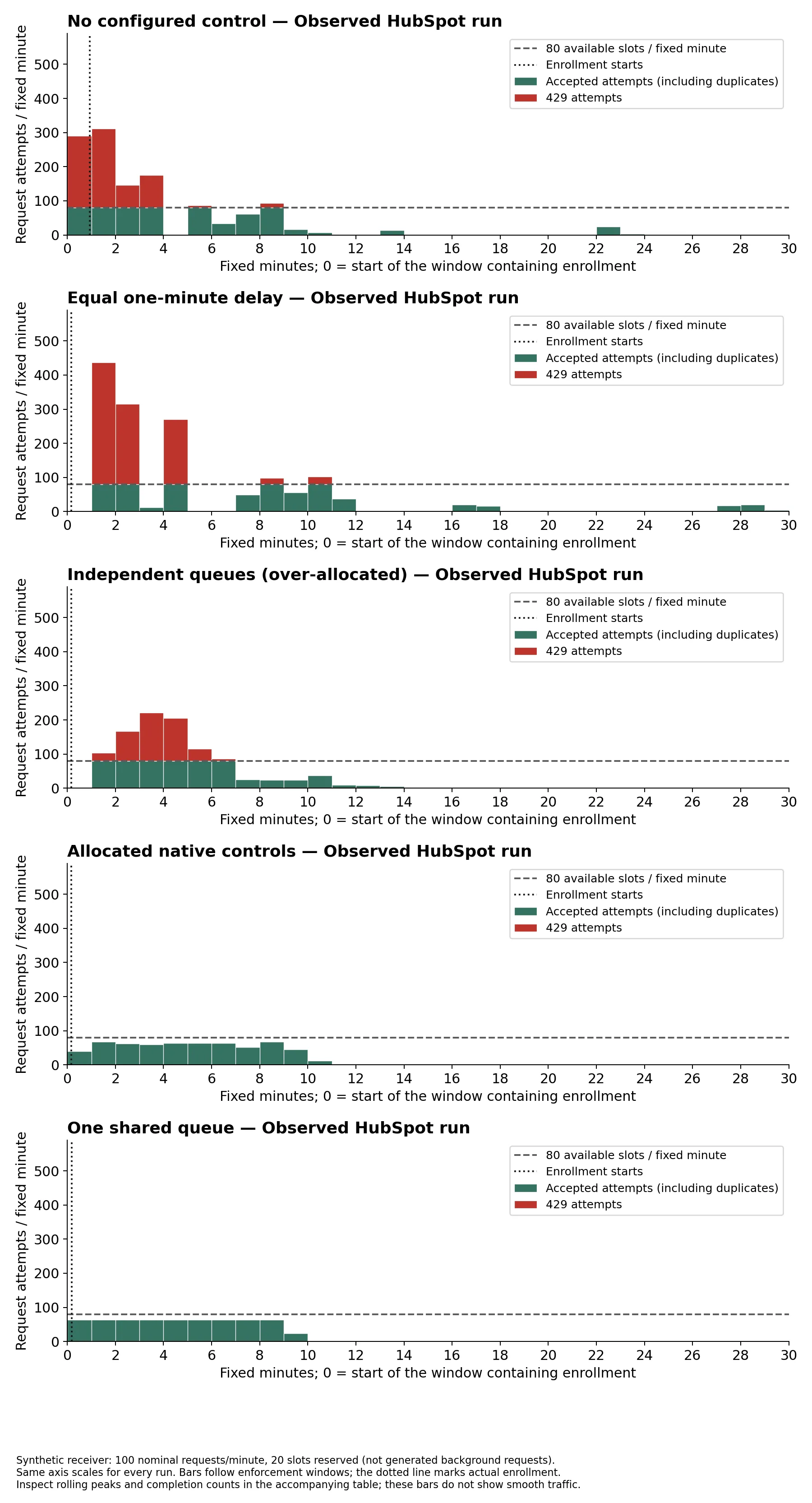
For each comparison, we ran three manual-only workflows in a HubSpot test account on 9 September 2026. Each enrolled its own exact segment of 100 synthetic contacts. Every contact’s custom-code action sent a lookup request followed by an update request: 300 records and 600 unique operations per comparison.
The same receiver admitted 80 requests in each fixed 60-second window: a nominal allowance of 100 minus 20 reserved slots. Those 20 slots represented a reservation, not generated background traffic. We ran comparisons sequentially with a fresh receiver state and run ID each time. Windows were anchored to receiver startup; completion time started at the first recorded enrollment request.
| Configuration | Records complete | Completion time | All requests | First-attempt 429s | All-attempt 429s | Retry requests |
|---|---|---|---|---|---|---|
| No configured controlNo delay, queue or native action limit | 300 / 300 | 22m 53.9s | 1268 | 251 | 624 | 668 |
| Equal one-minute delayOne-minute delay for every record | 300 / 300 | 28m 56.0s | 1461 | 283 | 823 | 861 |
| Independent queues (over-allocated)32 records/minute in each of three queues | 300 / 300 | 12m 59.1s | 1036 | 237 | 420 | 436 |
| Allocated native controls11 + 11 + 10 executions/minute across A/B/C | 300 / 300 | 10m 17.4s | 600 | 0 | 0 | 0 |
| One shared queue32 records/minute combined across A/B/C | 300 / 300 | 9m 15.1s | 600 | 0 | 0 | 0 |
First-attempt 429s count the first received request for each operation; one record can contribute up to two. A retry request is another received attempt for the same workflow, record and operation. It is not a count of whole action re-executions. The action stopped on an Axios failure and threw the original error for HubSpot’s retry handling. Successful duplicate attempts consumed allowance but did not repeat the modeled business effect. A record counted as complete only after both operations succeeded.
The shared queue completed 300 records in 9m 15.1s, with 0 receiver-generated 429s. Its peak rolling 60-second interval contained 128 requests. This is why a successful test against fixed windows is not a guarantee for a provider enforcing a strict rolling-minute limit.
The correctly allocated native controls also completed 300 records with 0 receiver-generated 429s, in 10m 17.4s. Their peak rolling minute contained 72 requests in this run. Native controls can be enough when you account for the combined budget; a shared queue is a different way to allocate it, not a requirement for success.
| Configuration | Unique successful operations | Accepted duplicate requests | Most requests in a rolling second | Most requests in a rolling 60 seconds | Inspect the evidence |
|---|---|---|---|---|---|
| No configured control | 600 / 600 | 44 | 285 | 599 | Requests CSV · Windows CSV · Summary · Roster & settings |
| Equal one-minute delay | 600 / 600 | 38 | 146 | 496 | Requests CSV · Windows CSV · Summary · Roster & settings |
| Independent queues (over-allocated) | 600 / 600 | 16 | 80 | 279 | Requests CSV · Windows CSV · Summary · Roster & settings |
| Allocated native controls | 600 / 600 | 0 | 8 | 72 | Requests CSV · Windows CSV · Summary · Roster & settings |
| One shared queue | 600 / 600 | 0 | 60 | 128 | Requests CSV · Windows CSV · Summary · Roster & settings |
Reproduce the comparison
Download the reproduction kit (ZIP) for the receiver, HubSpot action source, analyzer, chart generator, tests and step-by-step setup. The separate run downloads contain sanitized elapsed-time logs and complete synthetic rosters. No customer contacts or email addresses were used.
The equal-delay configuration waits one minute before code. The independent queues each release 32 records per minute, deliberately over-allocating the shared budget. The shared queue releases 32 combined. The native comparison allocates 11, 11 and 10 executions per minute to A, B and C, also totaling 32. All use the same two sequential requests and platform retry handling.
How to interpret these results
These are single observed runs against a synthetic fixed-window service, not guaranteed completion times or a benchmark of HubSpot’s maximum throughput. The temporary HTTPS tunnel can have its own transport limits; the logs only count requests that reached the receiver. They cannot establish that no request failed before arrival.
Fixed-window compliance does not prove rolling-window or concurrency compliance. Releases are batches, and downstream scheduling changes their arrival times. Inspect the rolling peaks and your destination’s actual rules before copying any setting. Daeda does not inspect or limit every HTTP request made after a workflow is released.
07 / TROUBLESHOOT
Why am I still getting 429 errors after adding a rate limit?
Check other callers, the real requests per execution, shorter rate windows and concurrency limits. Then inspect retries and daily usage. A workflow throttle changes when records continue; it does not automatically enforce every API limit or retry a failed downstream operation.
| Symptom | Likely explanation | What to inspect | Next action |
|---|---|---|---|
| Each workflow works alone; together they fail | The separate budgets add up to too much | Shared token/account and combined arrivals | Divide budgets or use a shared queue |
| 429s at the start of each release | A batch exceeds a shorter window or concurrency cap | Batch size, sub-minute limits and concurrency | Use smaller batches or pace requests in the caller |
| More calls than the calculation predicted | Executions make additional requests | Lookups, pagination, polling, branches and retries | Count worst-case requests and recalculate |
| Failures later in the day | A longer-period quota may be exhausted | Daily allowance and unrelated integrations | Set a usage budget; a minute limit alone is insufficient |
| Retries create duplicate updates | The action repeats a previously successful operation | Which operations succeeded before the error | Use idempotency keys or deduplicate business effects |
| Requests arrive long after queue release | Scheduling or downstream work changes arrival time | HubSpot history and downstream delays | Inspect the actual caller; do not infer timing from releases |
Retry behaviour belongs to the action making the request. For custom code, HubSpot documents retry conditions for supported libraries and requires errors to be thrown or raised rather than swallowed. Workflow webhooks have their own retry behaviour and support for Retry-After. Check the appropriate documentation for your action and preserve duplicate protection. Custom-code retries · Webhook retries.
If an external integration is calling HubSpot independently, put the limiter in that integration. A throttle before HubSpot custom code can pace executions that call HubSpot, but it cannot control outside callers. Read the HubSpot API limits reference.
SOURCES & METHOD
Check the details behind the guide
Platform instructions were checked against official HubSpot documentation on 9 September 2026. Daeda behaviour was checked against the action handlers and queue worker; the configuration images come from a live test account. Conceptual diagrams are labelled as illustrations. Measured outcomes link to the receiver data and full synthetic rosters.
- HubSpot custom-code actions: settings, inputs, outputs and retries
- HubSpot workflow webhooks: availability, limits and retries
- HubSpot custom actions: blocking and completing an execution
Daeda Technologies publishes this guide and builds Daeda Throttle, formerly Daeda Essentials. Product recommendations here describe where our queue fits; native controls remain a valid option.
Free planning tool
API rate limit calculator
Model the whole burst, reserve capacity for other callers, and calculate a safe release plan. Private-app daily limits are shared across the account.
Recommended starting point
32 records every 1 minuteYour full batch would exceed the safe allowance if released at once.
- Safe request allowance
- 64 requests per window
- Estimated batch time
- 10 minutes
- Recommended control
- Shared Throttle
- Total workload
- 600 requests across 300 records
- Daily capacity after batch
- No general daily limit included
Example settings, not a guaranteed safe rate. Place the shared throttle before the downstream action and verify request arrivals at the API.
See Daeda ThrottlePUT THE PLAN TO WORK
One allowance.
Every workflow accounted for.
Calculate your starting rate, choose the control that fits, then verify the receiving API.