
Service Hub Ops Guide
HubSpot ticket routing when no agent is available
Choose native or workflow-based HubSpot ticket routing, protect existing owners, and give unassigned tickets a clear review path. Includes a test worksheet.
On this page
HubSpot ticket routing should answer two questions: who can take this ticket, and who will notice if nobody can? Choose the assignment method first, then make the unassigned path as deliberate as the successful one.
Picture the last agent finishing for the day. A new support request arrives. Your availability rule correctly excludes everyone, so the ticket has no owner. The rule worked. The customer is still waiting.
An empty agent pool means nobody qualifies for assignment. An empty ticket queue means there is no waiting work. This guide is about the first problem, including how to keep it from becoming an invisible backlog.
Choose where assignment happens
A ticket can enter through a connected Help Desk channel and be assigned there, or be assigned by a ticket-based workflow. Team assignment and Ticket owner are also different: knowing which team should handle a request does not always identify the person responsible for it.
Start with the native options. HubSpot’s Help Desk routing guide documents availability-aware routing on Service Hub Professional and Enterprise, with Service seat and access requirements. Team-email routing offers load-balanced, round-robin and random distribution. With availability-only assignment enabled, a ticket can remain unassigned if no agent is available.
| What you need | Start here | What to verify |
|---|---|---|
| Assign incoming requests from one Help Desk channel | Native channel routing | Channel settings, eligible users and the unassigned path |
| Branch on ticket properties before assignment | A native ticket-based workflow | Enrollment, owner protection and available assignment controls |
| Inspect a selected owner before deciding whether to update the ticket | Daeda’s Action Outputs variant in a ticket workflow | Action access, candidate pool, returned outputs and guarded update |
Native ticket-workflow assignment also offers distribution choices on qualifying Service Hub plans. HubSpot currently documents its workflow availability option as a beta. Check the actual action and user eligibility in your portal; do not assume all paid seats are interchangeable.
An app is not required just because you want to avoid assigning work to someone who is away. Use the simplest method that satisfies the complete handoff.
Give one mechanism responsibility for the owner
Before adding a routing workflow, inspect the channel’s existing assignment setting. If the channel picks an owner and a separate workflow immediately picks another, a correct result from each can still produce an unwanted reassignment.
For the example below, the proposed design is a dedicated test team-email channel feeding Help Desk, with a separate ticket-based workflow responsible for first assignment. The channel would leave incoming tickets unassigned. The workflow would only enroll tickets from that test source whose Ticket owner is unknown.
Help Desk has a Use assignment workflow option for supported channel setups. That does not establish that every third-party action appears in its selector. Verify compatibility in the portal if you use that integration. This example uses a separate workflow and does not assume selector support.
Write down four things before testing:
- The precise ticket source and how enrollment identifies it.
- The one workflow responsible for first assignment.
- Which other workflows, integrations or teammates can update Ticket owner.
- What happens if the ticket is already owned when the assignment step runs.
For first assignment, recheck that Ticket owner is unknown immediately before writing it. Keep re-enrollment off initially. This check reduces overwrites but is not a transactional lock against a simultaneous update. Existing tickets need a separate out-of-office cover policy, not accidental re-entry into new-ticket routing.
Choose an eligible support owner
Suppose the ticket belongs to one Support pool. Resolve that team choice before selecting an individual. Missing or ambiguous routing information should take a review path rather than a guessed assignment.
With Round Robin Assignment (Action Outputs), Smart Lead & Ticket Routing returns a candidate without that action writing the ticket owner itself. The next steps decide what to do with the result. The workflow action-output explainer explains this separation.
For a policy requiring availability, no out-of-office period and working hours, select the three conditions and use Property Match Logic: AND in the v2 action. OR is the default and accepts a user matching any selected condition. Confirm that your action version exposes the control.
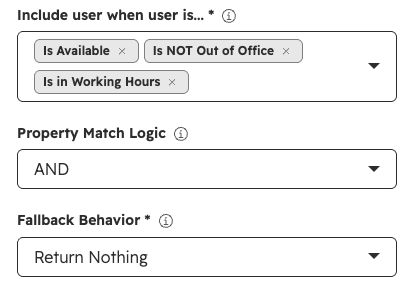
Shared action-configuration reference, captured in an unsaved v2 Action Outputs panel on 10 September 2026. It does not show a selected Support pool, a ticket workflow or a successful assignment. No assignment was run. View full size.
For this example, use Return Nothing as the fallback, then branch on User Returned:
- True: recheck the overwrite policy, then use Assigned Owner ID to update Ticket owner.
- False: skip the owner update, record the reason and notify the exception reviewer.
Use the round-robin setup guide for the shared action fields. Its worked record is a contact; this workflow must target the ticket’s owner property.
Make the no-agent path visible
There are several ways to handle a failed selection. Choose one on purpose and test its exact behaviour.
| Daeda fallback | Result to handle | The operational decision |
|---|---|---|
| Return Nothing | No user returned | Skip the owner update and send the ticket for monitored review |
| Return Selected User | A designated fallback user returned | Confirm that this person is responsible for cover; the fallback bypasses the normal availability filter |
| Fail Action | The action reports failure | Monitor the error and guard later steps; failure does not guarantee that every subsequent action stops |
Returning no user is an action result, not a newly created queue or a notification. It does not clear an existing owner. You still need workflow steps and a human process around it.
- Confirm this ticket needs an ownerRight source, matching Support pool and no existing owner. Otherwise preserve ownership or review the mismatch.
- Select from the eligible poolApply the agreed availability rule, then inspect User Returned.
- If a user is returnedRecheck the owner guard and update Ticket owner. Monitor actual follow-up separately.
- If no user is returnedSkip the owner update. Flag the ticket in a monitored view and notify the named reviewer and backup.
Both paths need follow-up. A populated owner field does not prove a customer has received a response.
For the unassigned path, name the Support duty lead and a backup. Agree when they check the view, how they receive alerts and what happens outside staffed hours. Confirm notification delivery in a test; an action being configured is not evidence that the right person received it.
For this design, the review view should identify the test source, tickets still requiring attention and the no-eligible-agent reason. Check that subsequent status or owner changes remove resolved items from the view. A ticket that disappears because a filter was wrong has not been handled.
Test the handoff, including the exceptions
Run dedicated test tickets through the chosen entry path. Record each ticket ID, starting state, enrollment, action output, final owner and review evidence. These are expected outcomes, not completed test results:
| Test | Expected outcome | Evidence required |
|---|---|---|
| One Support agent meets the rule | Assign within the Support pool | Ticket source, action output and final owner |
| Nobody meets the rule | Skip owner update and notify the reviewer | No-user output, unassigned ticket in the review view and delivered notification |
| Ticket already has an owner | Preserve the existing owner | Enrollment or guard history and unchanged owner |
| Agent becomes unavailable after assignment | No automatic redistribution from this selection action | Existing owner unchanged, unless a separately designed process intervenes |
| Another process claims the ticket before the update | Skip the update when the guard detects the owner | Latest owner value and workflow history; investigate any competing write |
Use the filled routing test worksheet (CSV) to adapt this design, or start with the blank worksheet (CSV). Each row records the entry channel, assignment authority, pool, availability rule, expected fallback, reviewer, observed owner and evidence. The example leaves observations unverified; replace the role labels with real reviewers before running it.
Track time waiting for an owner separately from time waiting for a first response. Also review no-agent outcomes and unexpected owner changes. Those measures answer different questions and should not be merged into one routing-success number.
Keep the routing choice proportionate
Native Help Desk or ticket-workflow assignment may already meet your needs. If it does, keep the unassigned review process and use the native route.
Consider Daeda when your workflow needs availability filtering plus a returned owner you can inspect before updating the ticket, or when you want Advanced Routing’s weighted allocation, open-ticket caps and reassignment after no response. It does not enforce HubSpot SLA targets or redistribute tickets agents already hold. The Smart Lead Simulator shows how weighting, caps and reassignment behave before you build the workflow.
Check Smart Lead & Ticket Routing’s fit against that requirement, or explore the wider workflow reliability guides.
Sources and action fields checked on 10 September 2026. The workflow, channel and result examples above have not been executed in a portal.
A few common questions
Frequently asked questions
Does native HubSpot route tickets to available agents?
Yes. Native Help Desk routing has availability controls, and qualifying ticket workflows also offer availability-aware assignment. Check the channel, Service Hub plan, seats and any required beta access in your account before adding an app.
What happens if everyone is away?
Native Help Desk can leave tickets unassigned when availability-only routing finds no eligible agent. With Daeda's Action Outputs variant and Return Nothing fallback, no user is returned. Your workflow must skip the owner update and direct the ticket to a monitored review path. Those are distinct mechanisms, not one universal fallback.
Is selecting an owner the same as load balancing or SLA escalation?
Not by default. Smart Lead & Ticket Routing's Round Robin action selects an owner from an eligible pool. Its Advanced Routing profiles can add weighted allocation, a cap on each agent's open tickets (tickets not yet in a closed pipeline stage) and reassignment when the assigned agent logs no activity within a set time. They do not enforce HubSpot SLA targets or redistribute tickets an agent already holds. Check native HubSpot distribution and service controls for those requirements.
