
Permissions And Scopes
Daeda AI uses HubSpot OAuth permissions. Some permissions are required to install the app, and broader permissions are requested when you connect more data types or execute plans that need them.
Required At Install
Section titled “Required At Install”| Scope |
|---|
| crm.schemas.companies.read |
| crm.schemas.contacts.read |
| crm.schemas.deals.read |
| oauth |
| tickets |
Required scopes are requested during the first HubSpot authorization so Daeda AI can load the app and understand the basic portal structure.
Optional App Scopes
Section titled “Optional App Scopes”Optional scopes let Daeda AI work with more HubSpot objects and tools. You can re-authorize the app when a plan needs access that has not yet been granted.
| Scope |
|---|
| automation |
| automation.sequences.enrollments.write |
| automation.sequences.read |
| cms.membership.access_groups.write |
| commerce.payment_accounts.read |
| communication_preferences.read |
| content |
| conversations.read |
| crm.export |
| crm.lists.read |
| crm.lists.write |
| crm.objects.appointments.read |
| crm.objects.appointments.write |
| crm.objects.carts.read |
| crm.objects.carts.write |
| crm.objects.commercepayments.read |
| crm.objects.companies.read |
| crm.objects.companies.write |
| crm.objects.contacts.read |
| crm.objects.contacts.write |
| crm.objects.courses.read |
| crm.objects.courses.write |
| crm.objects.custom.read |
| crm.objects.custom.write |
| crm.objects.deals.read |
| crm.objects.deals.write |
| crm.objects.goals.read |
| crm.objects.invoices.read |
| crm.objects.leads.read |
| crm.objects.leads.write |
| crm.objects.line_items.read |
| crm.objects.line_items.write |
| crm.objects.listings.read |
| crm.objects.listings.write |
| crm.objects.orders.read |
| crm.objects.orders.write |
| crm.objects.owners.read |
| crm.objects.products.read |
| crm.objects.products.write |
| crm.objects.projects.read |
| crm.objects.projects.write |
| crm.objects.quotes.read |
| crm.objects.quotes.write |
| crm.objects.services.read |
| crm.objects.services.write |
| crm.objects.subscriptions.read |
| crm.objects.users.read |
| crm.objects.users.write |
| crm.schemas.companies.write |
| crm.schemas.contacts.write |
| crm.schemas.custom.read |
| crm.schemas.deals.write |
| forms |
| sales-email-read |
| settings.users.read |
| settings.users.teams.read |
Grant optional scopes when the connected portal or the write plan needs that HubSpot area. Keep access aligned with the work users want Daeda AI to perform.
Marketing Email Performance
Section titled “Marketing Email Performance”Select Marketing Emails under Marketing plugins when connecting a portal, then authorize the requested access. For an existing connection without HubSpot’s content scope, expand its portal card, choose Add Marketing Email access, then follow Reconnect for Marketing Emails. HubSpot grants this broader scope even though Daeda’s marketing email sync only reads data.
The marketing_emails table contains aggregate performance per marketing email. Match naming conventions against internal_name, for example internal_name LIKE 'Customer Update%'; the subject is a separate field. This table is separate from CRM email activities and sales emails and does not provide recipient-level opens or clicks. Missing statistics remain null rather than becoming zero. Check sync status and freshness before interpreting missing results.
Scopes Used By Supported Actions
Section titled “Scopes Used By Supported Actions”| Scope | Catalog usage |
|---|---|
| automation | 4 supported actions |
| automation.sequences.enrollments.write | 1 supported actions |
| automation.sequences.read | 1 supported actions |
| cms.membership.access_groups.write | 8 supported actions |
| crm.lists.read | 8 supported actions |
| crm.lists.write | 8 supported actions |
| crm.objects.companies.write | 20 supported actions |
| crm.objects.contacts.write | 30 supported actions |
| crm.objects.custom.read | 1 supported actions |
| crm.objects.custom.write | 22 supported actions |
| crm.objects.deals.write | 20 supported actions |
| crm.schemas.companies.write | 6 supported actions |
| crm.schemas.contacts.write | 6 supported actions |
| crm.schemas.custom.read | 3 supported actions |
| crm.schemas.deals.write | 9 supported actions |
| forms | 3 supported actions |
| tickets | 20 supported actions |
This table helps users and support teams understand why a plan asks for more access. The same scope can support several action types.
Missing Permissions
Section titled “Missing Permissions”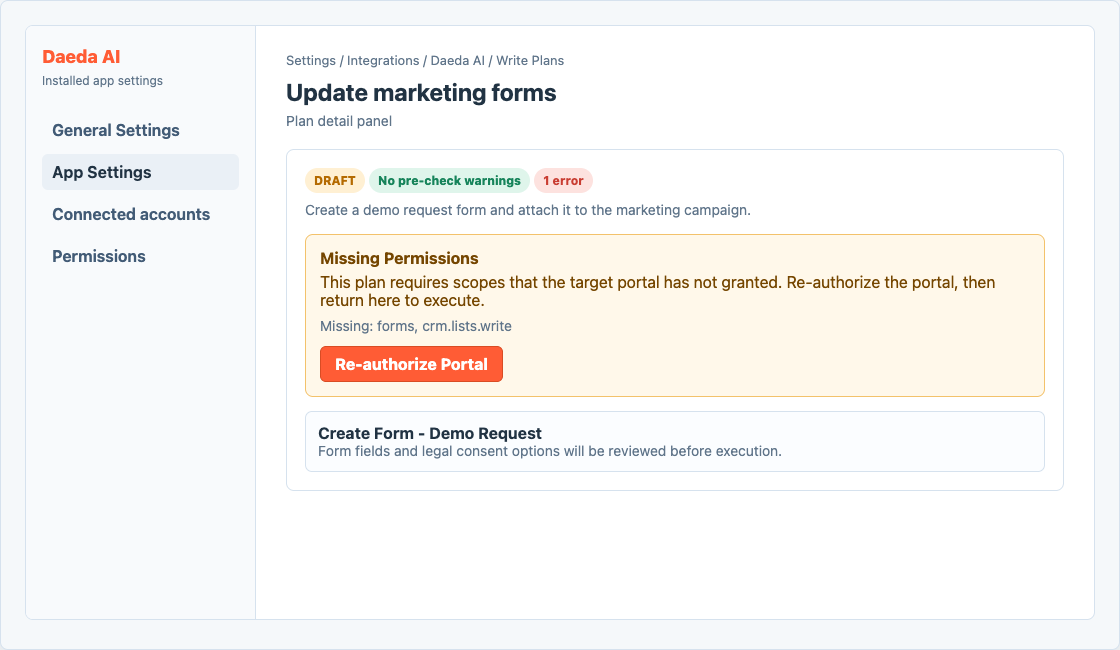
Missing permission warnings tell users to re-authorize Daeda AI before executing a plan.
If a write plan shows Missing Permissions, re-authorize Daeda AI from the prompt in the plan detail view, then reload or revalidate the plan before executing.
Do not execute a plan while required access is missing. Re-authorize first, confirm the warning is gone, then repeat the normal review checklist.