
Portal Sync And Data Access
Portal sync controls what data Daeda AI can read and how connected portals are prepared for richer planning. The Connect Client Portal flow lets you choose data access, install Daeda AI on the target portal, and save mirror configuration.
Connect A Portal
Section titled “Connect A Portal”- Open Connect Client Portal.
- Select the data types to share.
- Generate an install link.
- Open the install link and authorize Daeda AI in the target portal.
- Return to Daeda AI and complete mirror setup if prompted.
After connection, use the connected portal card to confirm the portal identity and readiness before creating plans for that portal.
Data Access Groups
Section titled “Data Access Groups”| Data type | Primary scope | Additional scopes |
|---|---|---|
| Contacts | crm.objects.contacts.read | None |
| Companies | crm.objects.companies.read | None |
| Deals | crm.objects.deals.read | None |
| Tickets | tickets | None |
| Products | crm.objects.products.read | None |
| Line Items | crm.objects.line_items.read | None |
| Quotes | crm.objects.quotes.read | None |
| Emails | sales-email-read | None |
| Marketing Emails | content | None |
| Custom Objects | crm.objects.custom.read | crm.schemas.custom.read |
| Lists | crm.lists.read | None |
| Automation | automation | automation.sequences.read |
| Communication Preferences | communication_preferences.read | None |
| Conversations | conversations.read | None |
| Forms | forms | None |
| Appointments | crm.objects.appointments.read | None |
| Listings | crm.objects.listings.read | None |
| Projects | crm.objects.projects.read | None |
| Services | crm.objects.services.read | None |
| Leads | crm.objects.leads.read | None |
| Goals | crm.objects.goals.read | None |
| Invoices | crm.objects.invoices.read | None |
| Subscriptions | crm.objects.subscriptions.read | None |
| Payments | crm.objects.commercepayments.read | None |
| Users | crm.objects.users.read | settings.users.read, settings.users.teams.read |
| Orders | crm.objects.orders.read | None |
| Carts | crm.objects.carts.read | None |
| Courses | crm.objects.courses.read | None |
| Owners | crm.objects.owners.read | None |
Each data access group maps to the HubSpot access Daeda AI needs for that type of data. Add groups when users need plans that refer to those records, assets, or settings.
Connected Portal Status
Section titled “Connected Portal Status”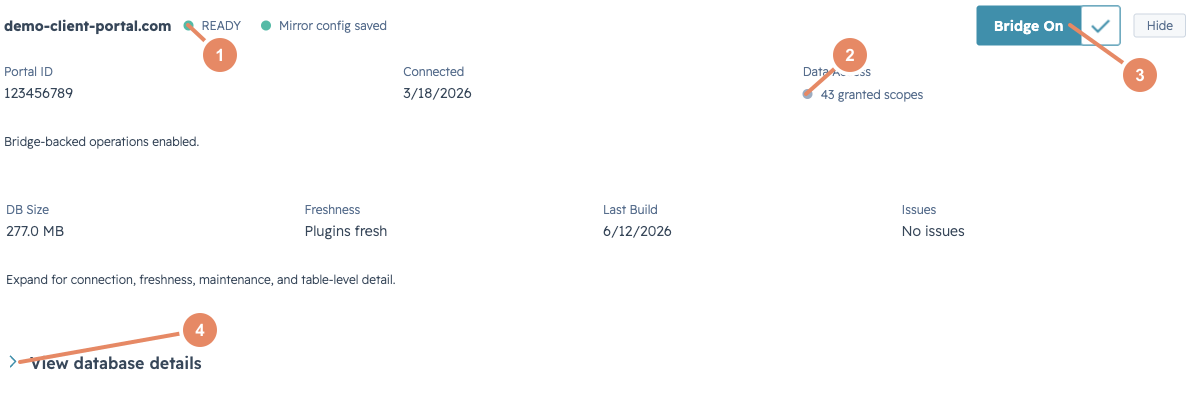
Connected portal cards show mirror readiness, database state, granted access, and bridge enablement.
Connected portals show the portal name or ID, when the portal was connected, the number of granted scopes, mirror config status, database status, and whether bridge-backed operations are enabled.
Use this status before execution. A portal with incomplete data access can still receive simple changes, but plans that rely on mirrored context should wait until the connected portal shows ready data.
Database States
Section titled “Database States”| State | Meaning |
|---|---|
| BUILDING | Daeda AI is preparing or refreshing mirrored data. |
| FAILED | The latest build or refresh did not complete successfully. |
| IDLE | No build is currently running. |
| PARTIAL | Some data is available, but the mirror may not be complete. |
| READY | Mirrored data is ready for use. |
Use READY as the normal state for planning. BUILDING means Daeda AI is preparing data. PARTIAL means some data is usable with gaps. FAILED means the latest build needs attention before users rely on mirrored data.